Introducing Praktika Smart AI Scribing: Faster, Cleaner Clinical Notes in Praktika
5 Nov 2026 · The Praktika Team
Every dentist knows the feeling. The last patient has left, the surgery is quiet, and there’s a stack of clinical notes still to write.
Today we’re introducing Smart Clinical Notes, a new AI-assisted add-on for Praktika that turns quick, rough notes or dictation into clean, structured clinical records, right inside the clinical notes screen you already use.
What Smart Clinical Notes does
Smart Clinical Notes sits directly in the Praktika clinical note editor. Dictate or write your note the way you’d naturally jot it down, typos, shorthand and all, then let the AI assistant tidy it into a properly structured clinical note.
How it works
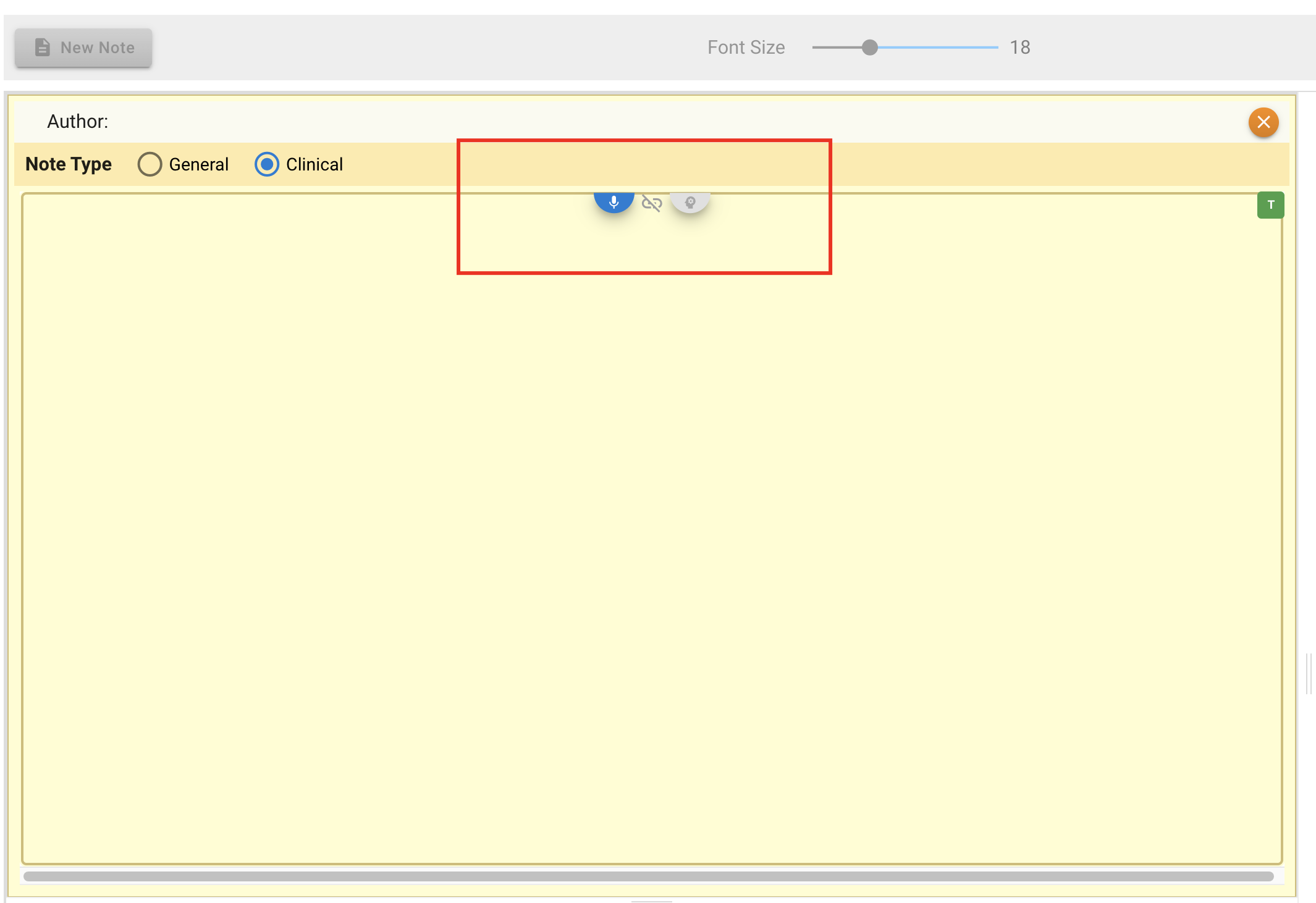
When Smart Clinical Notes is active for a practitioner, three new controls appear at the top of the clinical note editor:
- Microphone – dictate your note instead of typing it.
- Auto-refine toggle – when switched on, Praktika will refine the speech straight after recognition, so your dictation goes straight from spoken words to a structured note.
- Refine button – turn whatever is in the editor, typed or dictated, into a clean, structured clinical note on demand.
A typical workflow looks like this:
- Open the appointment and click Clinical Notes.
- Start a new note and choose Clinical as the note type.
- Type or dictate what happened in the appointment, as roughly as you like.
- Click Refine (or let auto-refine do it for you).
- Review the result, edit and save.
You stay in control
We built Smart Clinical Notes to assist clinicians, not replace their judgement.
- Your note is saved as a draft while you work. It appears in the patient’s notes list marked CLINICAL (DRAFT), so nothing is lost if you’re interrupted, and it’s clear the note is still in progress.
- It works only from what you give it. If you hit Refine with nothing entered, Smart Clinical Notes responds with “No clinical information provided.” rather than inventing content. It structures and tidies your notes; it doesn’t make up clinical findings.
- You review before you finalise. The refined note is fully editable, so you can adjust wording, add detail or correct anything before it becomes part of the patient’s record.
Turning it on for your team
Smart Clinical Notes feature is billed per user, so you can choose exactly which team members will be using it. Practice administrators can manage it in a few clicks:
- Go to Management > Practice Staff.
- Open the new Subscriptions tab.
- Find the staff member (use the name filter or group by user, subscription or position).
- Click Opt In next to their name.
- Read and accept the Service Agreement – Terms and Conditions and Privacy Policy , then click Next to complete the setup.
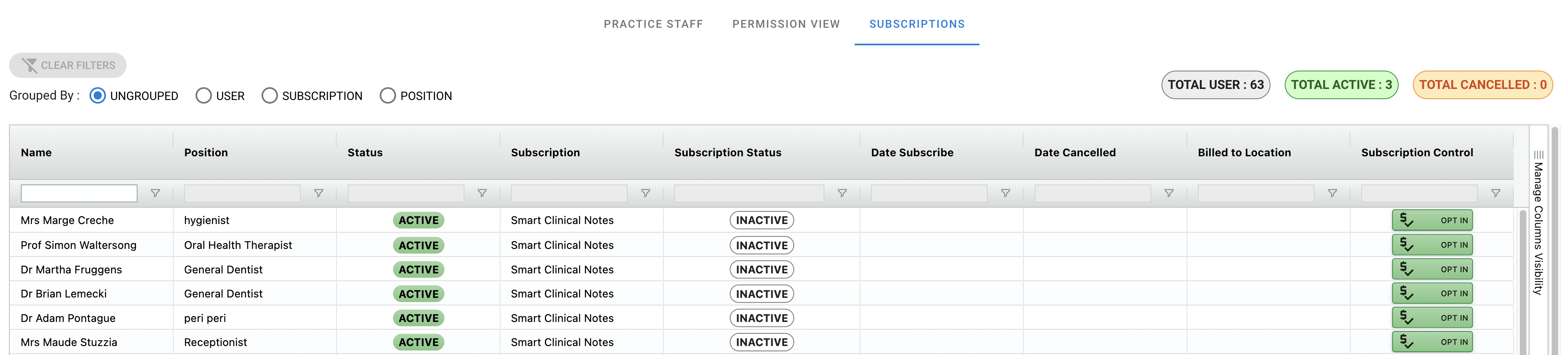
The Subscriptions tab gives you a clear overview of your whole team at a glance: total users, how many are active, how many have cancelled, the date each person subscribed and, for multi-location practices, which location each subscription is billed to. Need to remove someone? Just click Opt Out.
Pricing
Smart Clinical Notes costs $20 per user, per month. Because it’s per user, you only pay for the clinicians who actually use it.
Before you opt in
As part of introducing AI Smart Notes, we’ve updated our legal documents to cover the use of AI.Before subscribing, the practice owner or manager will need to read and accept the updated documents:
Privacy Policy
https://praktika.com.au/legal/PrivacyPolicy.html
Terms and Conditions
https://praktika.com.au/legal/TermsAndConditions.html
Get started today
Smart Clinical Notes is available now for Praktika practices. Head to Management > Practice Staff > Subscriptions to switch it on for your team.
Have questions, or want a walkthrough? Our support team is happy to help. Use Request Support or Chat & Help Assistant in Praktika’s menu to get in touch.
You Can Watch the Video Demonstration Linked below also
Less time on paperwork. More time with patients.